UVC: USB Video Class.
2. Functional Characteristics
Video functions are located at interface level.
Each video function has one VC interface (VideoControl) and can have several VS interfaces (VideoStreaming).
VideoControl interface (VC): access device controls.
VideoStreaming interface (VS): transport data streams to and from the function.
Video Interface Collection (VIC): The set of VC and VS interfaces that belong to the same function.
Interface Association Descriptor (IAD): describe the VIC. See libusb_interface_association_desciptor
2.1 Video Interface Class
The only requirement for a video function to be part of this class is to expose one VC interface.
2.2 Video Interface Subclass and Protocol
There are two subclasses, identified by Interface Subclass code:
- VideoControl Interface
- VideoStreaming Interface
They can be identified by their subclass code:
| Video Subclass Code | Value |
|---|---|
| SC_UNDEFINED | 0x00 |
| SC_VIDEOCONTROL | 0x01 |
| SC_VIDEOSTREAMING | 0x02 |
| SC_VIDEO_INTERFACE_COLLECTION | 0x03 |
2.3 Video Function Topology
Each Video Function has two entities that allow to manipulate its properties:
- Units: Describe most video functions.
- Selector Unit
- Processing Unit
- Encoding Unit
- Extension Unit
- Terminals:
- Input Terminal (IT): Provides data streams
- Output Terminal (OT): Consumes data streams
- Media Transport Terminal
- Camera Terminal
2.3.3 Camera Terminal (CT)
Controls mechanical features of the device that transmits the video stream. Only applies to devices with controllable lens or sensor characteristics. It is always represented as an Input Terminal with a single output pin.
Features (support is optional?)
- Scanning mode.
- Auto-Exposure mode.
- Auto-Exposure priority.
- Exposure time.
- Focus.
- Auto-Focus.
- Simple Focus.
- Iris.
- Zoom
- Pan
- Roll
- Tilt
- Digital Windowing.
- Region of Interest.
Relevant note: The Focus control can optionally provide support for an auto setting (with an on/off state). If the auto setting is supported and set to the on state, the device will provide automatic focus adjustment, and read request will reflect the automatically set value. Attempts to programmatically set the Focus control when in auto mode shall result in protocol STALL with an error code of bRequestErrorCode = “Wrong State”. When leaving Auto-Focus mode (into manual focus mode), the control shall remain at the value that was in effect just before the transition.
2.4 Operational Model
A device can support multiple configurations, each config can have multiple interfaces, each can have alternate settings. Several video functions can exist in the same device
If a device has multiple video functions, there must be multiple VIC’s (and as such multiple IAD’s)
Example: Desktop camera with a microphone. This could be configured to have one interface collection dealing with configuration and control of the audio function, while another interface collection deals with its video aspects.
2.4.1 Video Interface Collection
A device must use an Interface Association Descriptor to describe a Video Interface Collection for each device function that requires a VC Interface and oner or more VS interfaces.
The IAD can be retrieved as part of the devices complete configuration descriptor by requesting GetDescriptor (Configuration)
2.4.2 VideoControl Interface
The host can manipulate the Units and Terminals in the Video Function, these are accesible via the single VideoControl interface. The interface can contain these endpoints:
- Control endpoint for Unit and Terminal settings. Mandatory, the default endpoint is 0.
- Interrupt endpoint for status returns. Sometimes Optional.
The spec defines a single alternate setting for the VC Interface, the default alternate setting zero
2.4.2.1 Control Endpoint
Enpoint 0 (default pipe) is the standard way to control the video function using class-specific requests. These requests are always directed to one of the Units of Terminals.
2.4.2.2 Status Interrupt Endpoint
VC Interfaces can support an optional interrupt endpoint to inform the Host about the status of different addressable entitites (Terminals, Units, interfaces and endpoints)
If the endpoint is present, it’s used by the VIC.
2.4.3 VideoStreaming Interface
Send data to and from host. They are optional. Each VS interface can have on isochronous or bulk data endpoint for video
TODO
This section is nice and all but too long, plus idc about transfers that much atm.
2.4.4 Control Transfer and Request Processing
Control transfers (aliased to Requests) (see libusb_control_transfer) have to transaction stages: Setup and Status. It may optionally contain a Data stage in-between those two.
- Setup: Contains all info necessary to address an entity, specify the operation and prepare the optional Data stage.
- Data: Can be in two directions (host-to-device / OUT or device-to-host / IN)
- IN transactions:
bRequestType’s “GET_*” - OUT transactions:
bRequestType’s “SET_CUR”.
- IN transactions:
- Status:
4. Class-Specific Requests
Used to set and get video related Controls. hese contrls fall into two main groups
- Manipulate controls (brightness, exposure, …)
- Influence data transfer over an endpoint (current frame rate)
4.1 Request Layout
4.1.1 Set Request

The bmRequestType field specifies that this is a SET request (D7=0). It is a class-specific request (D6..5=01), directed to either the VideoControl interface, or a VideoStreaming interface of the video function (D4..0=00001), or the video data endpoint of a VideoStreaming interface (D4..0=00010).
4.2 VideoControl Requests
4.2.2 Unit and Terminal Control Requests
Set or Read an attribute of a Control in a Unit or Terminal.
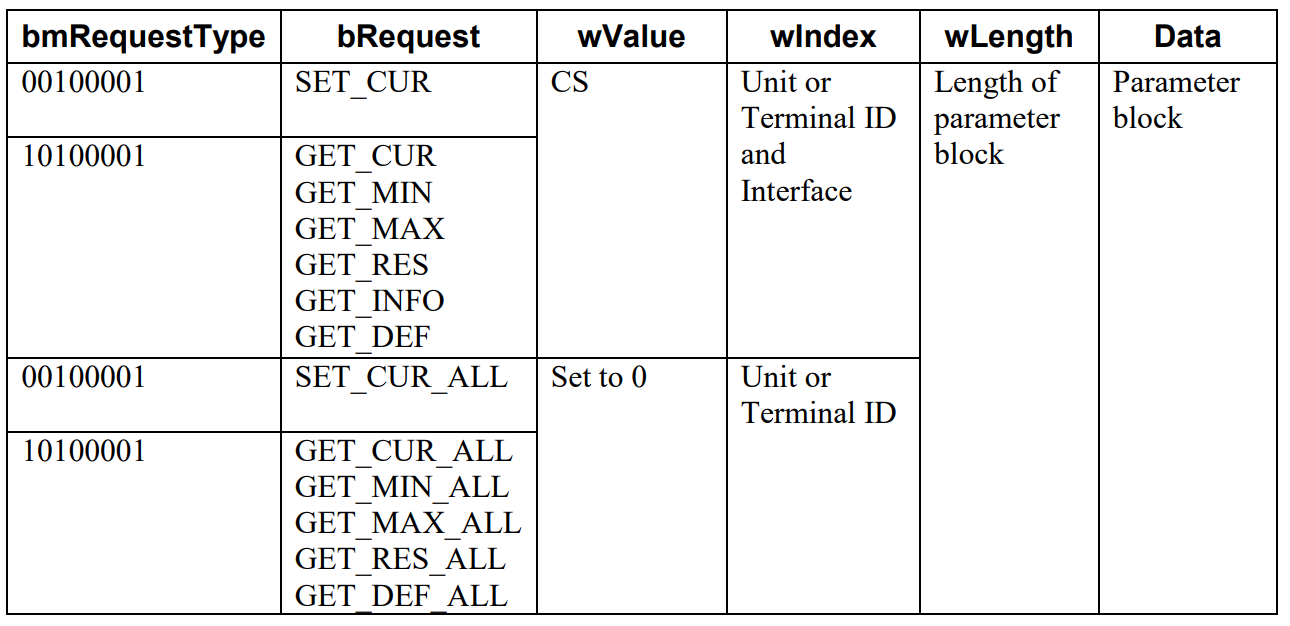
wValue: Control Selector (CS) in the high byte and 0 in the low byte.
4.2.2.1 Camera Terminal Control Requests
4.2.2.1.9 Focus, Auto Control
Value of 1 indicates that automatic adjustment is enabled. Trying to set controls programmatically will result in a protocol STALL and error code bRequestErrorCode = "Wrong State".
